


A local festival often has plenty of history and almost no current photography. Organizers want a poster before the new stage, lights, or decorations exist. An imagined scene can help people picture the mood, but the same image can later drift into news coverage and be mistaken for a record of what actually happened.
Nano Banana can support promotion if the workflow keeps invention attached to the poster brief and away from the documentary archive. The safest process starts with a source decision, not a style prompt: identify which elements are confirmed, which are merely planned, and which should remain symbolic.
Start with the Poster’s Truth BoundaryWrite down the event details that are already fixed: venue, date, organizer, ticket status, and any visual identity the organizer owns. Keep those facts outside the generated scene so they can be typeset and corrected normally. The image should carry mood and hierarchy, not act as the only place where essential information appears.
Mark confirmed, planned, and imagined details.
A confirmed detail already exists and can be checked, such as the venue facade or an approved mascot. A planned detail is promised but not yet built, such as a stage layout. An imagined detail is creative atmosphere, such as lanterns over a square. Put each item in one category. The prompt may stylize confirmed material and propose imagined atmosphere, but it should not present a planned feature as completed evidence.
Choose a source with a clear owner.
Use a photo supplied by the venue, organizer, or photographer with a known permission path. A file found in a chat without origin is weak source material. Record the filename and owner before uploading. Kimg AI accepts JPG and PNG references up to 30 MB, but technical acceptance is not editorial permission.
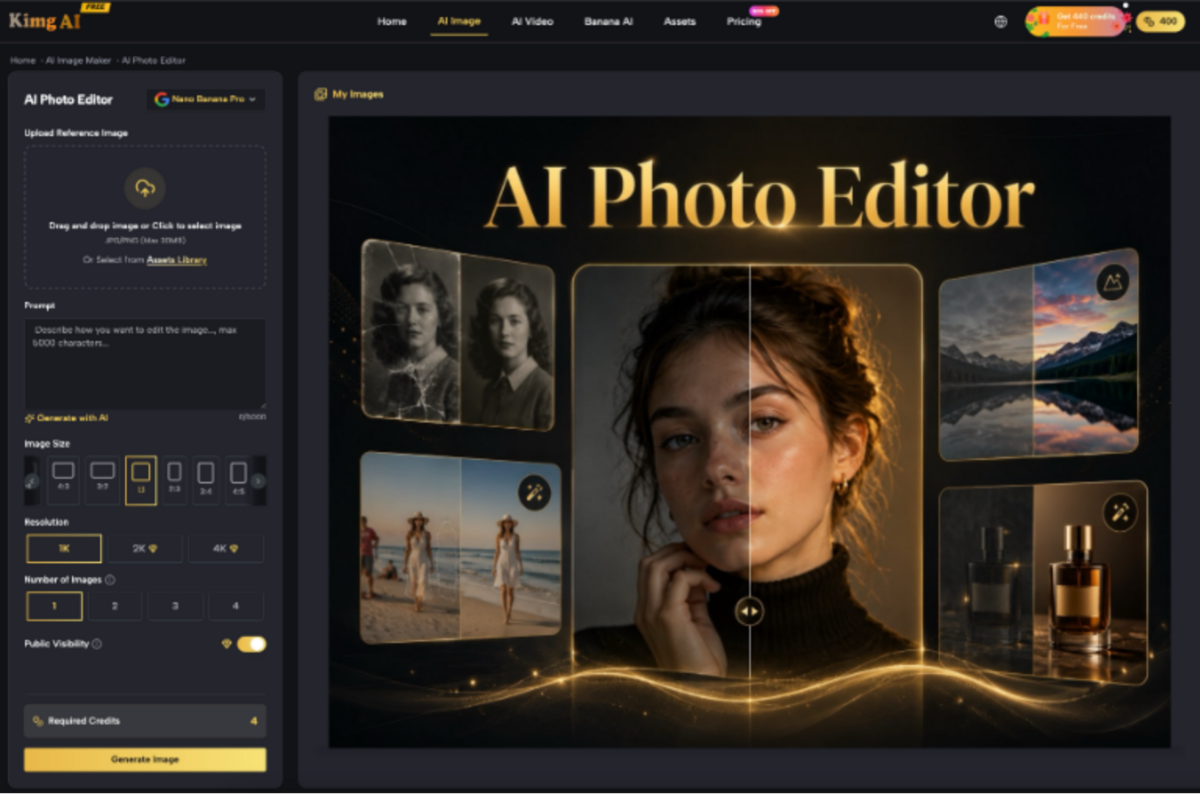
Follow Three Steps for the Poster Artwork
Three controlled passes keep the visual easy to inspect. Each pass answers a different question, so the organizer can stop and correct the job before detail compounds a mistake.
Pass One Locks the Empty Layout
Begin with the required format and mark where the event name, date, and sponsor marks will be typeset later. Ask for negative space rather than generated lettering. The image should make the text area usable across the intended crop, not produce decorative words that look almost correct.
Pass Two Adds Only the Event Mood
Describe the atmosphere in observable terms: warm evening light, paper lantern shapes, a quiet mountain outline, or a table of local food. Avoid invented crowd size, celebrity likenesses, or specific structures the venue has not approved. Kimg AI's prompt-led editor is useful here because the team can ask for a bounded change around an approved starting image.
Pass Three Tests the Smallest Crop
Take the candidate into the smallest planned slot, often a social tile or mobile listing. Check whether the main object survives and whether the empty text area remains clean. Do not approve the landscape poster first and assume the vertical version will work. The crop is part of the brief.
Consider a market poster built around a photograph of the town square. The wide artwork can show lanterns above the stalls, but the vertical version may cut away the building that identifies the venue. Adding another tower to fill that crop would change the place. Use a tighter photograph of the real entrance, or simplify the surrounding artwork until the existing landmark fits. The organizer should approve that substitution as a new composition before it joins the campaign.
Save the selected media from Kimg and one rejection reason after every pass. That note stops the next revision from reopening a decision that already worked.
Let the organizer approve each pass in the order shown. Layout approval means the scene has usable space; it does not approve the mood. Mood approval means the invented atmosphere stays within the promise; it does not approve the crop. Separating signatures may feel formal for a small event, but a short message such as “layout passes, lantern count does not” is enough to keep the revision focused.
Use one baseline across every required format.
Choose one accepted landscape image as the visual baseline, then derive the square and vertical versions from it. Do not generate three unrelated scenes and call them a family. Repeated subject position, color, and lighting help viewers connect the materials, while format-specific cropping keeps each slot readable. If the vertical crop needs a new composition, record that as a deliberate branch.
Separate Promotion from the Event Archive
Give generated poster art a folder and filename pattern that identifies it as promotional. Keep documentary photographs in a different archive. After the event, staff should not be able to drag the poster scene into a retrospective article simply because it is the most polished image available.
This separation matters in small organizations where the same person manages social posts, press releases, and photo storage. A clean directory boundary can prevent an accidental claim months later, when nobody remembers the original prompt.
Add a short provenance note to the poster package: source image owner, generation date, approved purpose, and the fact that the scene is promotional artwork. The note does not have to appear on the public poster, though public labeling may still be appropriate. Its main job is to stop internal reuse from erasing the image's origin.
Keep Verified Words as Editable Layers
Dates, prices, access instructions, and sponsor names change. Typeset them in a normal layout tool rather than embedding them in the generated pixels. The poster can then be corrected without asking the image model to redraw the whole scene. It also gives proofreaders text they can search and compare with the event notice.
Keep the approved copy in the project file. Kimg AI can generate or edit the background artwork; the source of truth for event details remains the organizer's schedule and ticket page.
Retire Imagined Scenes After the Campaign
At the campaign close, mark the generated scene as archived promotion. Do not let it become a generic “festival photo.” If the organizer wants a year-in-review image, use actual photography from the event or a clearly designed collage whose sources can be traced.
The archive can retain the prompt and accepted source for future design reference without treating the output as documentary media. That distinction lets next year's team reuse a color direction or composition idea while still commissioning or selecting real photographs for the historical record.

Publish Only What the Event Can Promise
Kimg AI suits local teams that need a visual concept before the physical setup exists and are willing to keep facts in editable text. It is not a replacement for event photography, a permission record, or a final proofreading pass.
It also suits early conversations with vendors. A generated mood scene can communicate placement and tone before materials are ordered, as long as everyone understands that dimensions, crowd capacity, and installed objects still come from the technical plan. The image helps the meeting; it does not certify the build.
The decision rule is concrete: if a viewer could mistake an invented object, crowd, or location detail for a confirmed part of the event, simplify it or remove it. A good poster invites people into the plan without quietly rewriting the local record.
Informazioni fornite in modo indipendente da un nostro partner nell’ambito di un accordo commerciale tra le parti. Contenuti riservati a un pubblico maggiorenne.


 SU
SU